 |  |  | |  |
| | |||
| |
Home > Plantronics Compatibility Guide and Product Info
How Does a Plantronics Headset Connect to My Phone?
IMPORTANT: Some telephones are headset-ready and some are not. If your phone DOES have a dedicated headset port, you will be able to directly connect a headset without the need to lift and lower your handset receiver for each call and without the need to purchase an external amplifier for your corded headset. If your phone DOES NOT have a dedicated headset port then you will require a Plantronics amplifier base with a corded headset, or an automatic handset lifter with a wireless headset. Please click here to see if your phone is listed as headset-ready. The list is always being updated so if you cannot find your phone model, please don't hesitate to call (800)333-0020 or send us an email at sales@founderstelecom.com You can also click here for the Plantronics Compatibility Guide. *********************************************************************************************************** *********************************************************************************************************** *********************************************************************************************************** 

***********************************************************************************************************
CORDED HEADSETS:
What is meant by "QuickDisconnect"?
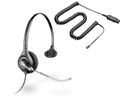
Plantronics QuickDisconnect (also called "QD") refers to the flat, black, plastic connector (photo at left) at the end of every corded Plantronics H-series headset and every Polaris P-series headset. H-series refers to headset model numbers beginning with the letter "H". The H-series headsets are all those displayed when you click on the blue menu buttons at the left side of this site entitled "Over-the-Head Headsets," "Over-the-Ear Headsets," "Convertible Headsets," and "Behind-the-Neck Headsets". Polaris P-series headsets were discontinued as of 8/15/08, however, the equivalent replacement solution (H-series with A10 cable) can still be found by clicking on on the blue menu button on the left side of this site entitled Polaris.
What are the benefits of QuickDisconnect?
The QD allows you to leave your desk while still wearing your headset. Simply pull apart the two QD pieces to leave your desk and snap them back together when you return. This eliminates the need to continually take your headset on and off and reposition it on your head or ear every time you need to leave your desk. The QD also acts as an "on hold" function. If you pull apart during a call, simply snap the QD pieces back together to resume your call.
Most common method of connecting any H-series Plantronics headset to a telephone:
The QD at the end of your headset cord must connect to a reciprocating QD in order to interface with your telephone (as explained further below). Many phones today are "headset-ready" and need only a connector cable rather than an external amplifier. To see if your phone is headset-ready, click on the Direct Connect Headsets tab on the left side of the screen. For phones that do not have a dedicated headset port, we recommend the Plantronics M22 Vista amplifier. The M22 is known as the "universal adapter" because of its widespread compatibility.
What about the Plantronics S12 complete corded headset system?
The Plantronics S12 complete corded headset system comes with everything you need in one convenient package. It connects to your phone in the same manner as described above and is compatible with the vast majority of single- or multi-line telephone sets. NOTE: Please be aware that the S12 does not have the QuickDisconnect feature.
List of Headset-Ready Phone Models:
Click here for a list of Direct-Connect phones with a square, modular headset jack (no amplifier required). The information at this link is by no means intended to be a complete list of telephones with dedicated headset ports. If you have any questions regarding compatibility with your phone, please don't hesitate to call us toll free at (800)333-0020 or click here for the Plantronics Compatibility Guide.
WIRELESS HEADSETS:
Will a Plantronics wireless headset work on my phone?
If you are looking for a wireless headset solution rather than corded, the Plantronics CS540 (or any other model starting with "CS") is compatible with the vast majority of single- and multi-line corded desk telephones. It comes complete (no need for a connector cable or amp) and the CS540 comes with both a headband and an ear hook and can be worn in either configuration.
How easy is the wireless headset installation and set-up?
Installation is quick and simple! Whether you choose a corded direct connect headset, a headset and amplifier or a wireless (CS540, etc.) headset solution, you will simply plug the device into your phone's dedicated headset port, or into the handset receiver port. It's just that easy!
Will I need an HL10 handset lifter or EHS Cable (electronic hookswitch) along with my wireless headset?
If you want to be able to answer and end a call remotely from the headset from anywhere in your 350 ft range, then you will need either the HL10 automatic handset lifter or one of the many EHS cables (electronic hookswitch cables). Without one of these optional add-ons, you will have to be at your desk in order to either press a button on your telephone or physically lift up your handset off the hook manually (depending on your phone model) to answer the call. To find out if your phone can use an EHS cable as opposed to the HL10 handset lifter, please click on this handy Plantronics EHS compatibility guide.


Additional Compatibility Information:
For Autodialer and Predictive Dialer Environments:
If you are using an autodialer or predictive dialer and your users will each be plugged into a standard RJ11 single-line, analog, modular port, many users choose the Plantronics T10 analog phone.
For Cordless Telephones with a 2.5mm Headset Jack: Are you looking for a headset that will plug into your existing cordless telephone? Check to see if your cordless phone has a 2.5mm headset jack. (These jacks are standard on most cordless phones manufactured in the past few years.) Once you've determined that your cordless phone is equipped with a round headset jack, simply click here. If you prefer a full-strength, commercial-grade Plantronics headset, select any H-series headset (those shown on this site in the sections entitled "Over-the-Head Headsets," "Over-the-Ear Headsets," "Convertible Headsets," and "Behind-the-Neck Headsets") along with a special patch cord with a Quick Disconnect device at one end (to connect to the headset) and a 2.5mm plug at the other end (to connect to your cordless phone headset jack).
For Cellular Telephones:
Click here to learn more about cellular phones with standard 2.5mm headset jacks as well as those without standard jacks. Call with any questions as phone models change frequently and we cannot list all the models currently on the US market. Click here if you are looking for a Plantronics wireless Bluetooth headset.
Other Phones:
The list above does not cover the hundreds of other phone models on the market today. There are many phones with specific idiosyncrasies not detailed above. Please feel free to call us toll free at (800)333-0020 so we can look up your model and recommend the right solution for you. You can also click here for the Plantronics Compatibility Guide.
Shop By Category
- Wireless
- Corded
- Computer
- Cellular
- AccessoriesShop All Plantronics Parts & Accessories

Handset Lifters & EHS Cables (Electronic Hookswitch Adapters) 
Rechargeable Batteries 
Voice Tubes (Clear) 
Ear Cushions 
Cables and Cords 
Ear Hooks 
In-Use Busy Lights for Wireless Headsets 
Headbands and Neckbands 
Plantronics Training Cords and Training Adapters 
Plantronics Replacment A/C Power Adapters 
Accessories for Wireless Headset Systems 
Ear Tips, Ear Gels, Earbuds 
Replacement Headsets 
StarSet H31 Accessories 
Accessories for M10, M12, M22 Vista 
Plantronics Value Packs 
Accessories for Bluetooth Headsets 
Plantronics Dispatch and Controller Adapters 
Computer Headset Parts and Accessories 
Clothing Clips 
Theft Reduction Devices 
Other Miscellaneous Accessories